
O melhor editor SQLite é aquele no seu editor
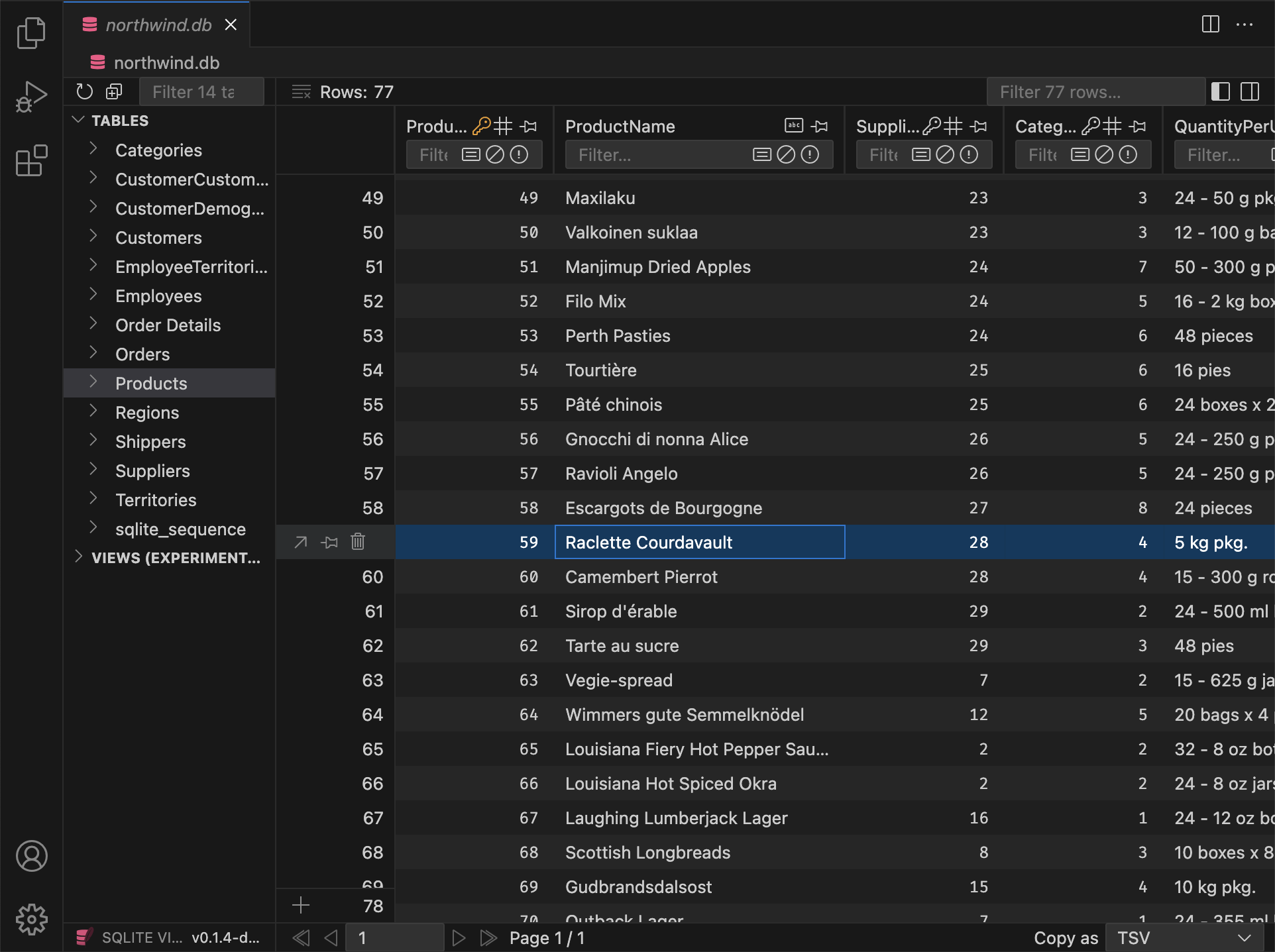
Faça seu trabalho sem sair do VS Code. Desbloqueie poderosos recursos de edição e exportação. Funciona em qualquer lugar, incluindo SSH e WSL.





 e outros*
Atualize para desbloquear fluxos de trabalho PRO exclusivos
Com sua integração profunda no VS Code, SQLite Viewer PRO habilita novos fluxos de trabalho com conveniência e velocidade incomparáveis.
Redesenhado do zero para as demandas PRO
Você pode pensar na versão PRO como SQLite Viewer 2. Não são apenas flags de recursos, mas um motor completamente novo sob o capô. Vem com garantias de failover do SQLite e suporte para arquivos grandes.

Cliente SQLite Nativo
A versão PRO usa a implementação oficial do SQLite, que fornece o conjunto completo de garantias de failover. O antigo cliente somente leitura permanece como fallback.

Tamanho Ilimitado
Todas as restrições de tamanho de arquivo são removidas, mesmo durante sessões remotas. Apenas os dados necessários para renderizar a interface são transferidos para sua máquina local.

Experiência Sem Anúncios
Clientes PRO desfrutam de uma experiência sem anúncios — perfeita para compartilhamento de tela e gravações. Além disso, clientes PRO recebem um ícone PRO exclusivo ( ) na interface.
Inclui tudo o que você gosta na versão gratuita
Atualizar para SQLite Viewer PRO é uma experiência perfeita. Basta inserir a chave de licença e você está pronto. Além de novos recursos PRO exclusivos, tudo o que você gosta na versão gratuita permanece como está.

Interface Performática
O SQLite Viewer é construído com foco em desempenho. Ele usa as melhores ferramentas que a pilha web tem a oferecer e é rotineiramente testado em hardware mais antigo para garantir que o desempenho permaneça de primeira linha.

Tema Correspondente
Diga adeus às interfaces de usuário desarticuladas. O SQLite Viewer ajusta-se automaticamente ao tema do VS Code e se integra perfeitamente à experiência existente do VS Code.
Configuração Fácil
O SQLite Viewer não depende de binários na sua máquina. Ele traz os seus próprios, de modo que simplesmente clicar em 'Instalar' completa a configuração. A extensão inteira pesa apenas 15 MB.

Funciona em Todo Lugar
Quer você esteja usando Cursor, VS Codium, CodeSandbox, GitPod, Google IDX ou outros forks do VS Code, o SQLite Viewer adapta-se ao seu ambiente e fornece o máximo de recursos possível.

Operado pelo Proprietário
O SQLite Viewer é desenvolvido por um único desenvolvedor dedicado. Ele desfruta de uma visão coerente e atenção aos detalhes que raramente é encontrada em produtos puramente comerciais.
e outros*

Atualizações, entregues continuamente
SQLite Viewer PRO continua melhorando com atualizações regulares e novos recursos. Veja o que há de novo abaixo:
v26.2.5 (Pre-Release, Hotfix)
PRO Fixed an issue that prevented inline foreign key previews from resolvingPRO Inline FK content no longer loads for collapsed items (only loads when expanded).
v26.2.4 Preview
PRO Markdown Preview
Columns that store markdown can now be viewed with a rendered preview in the row detail modal. A switch lets you toggle between plain text and the rendered view; You can treat any TEXT column as markdown by cycling its type in the column header (same gesture as for date/datetime). Declared types such as TEXT MARKDOWN or MDTEXT are recognized by default.
When you open a cell in a markdown column in VS Code, the file opens with a .md extension by default, so the editor uses markdown highlighting and tooling without relying on language detection.
Additions
PRO Backspace now sets the focused column to NULL for all selected rowsPRO In the row detail modal, date/time columns now show the same date display as in the table
Changes
- Resized textarea heights are now remembered for the duration of the session
- Opening a DB now selects the first table (not the first item, which could be a view)
PRO All buttons that cycle properties now reset to their default value on right-clickPRO Pragma Editor Optimize action now defaults to "Dry Run"PRO Date/raw toggle in modal is now per column
Fixes
PRO Batch edit in row detail now updates all selected rows correctlyPRO Fixed an issue where editing a cell via "Open in VS Code" could leave the selection stuck on "No row selected"- Ctrl+A (Cmd+A) in sidebar inputs selects all text in that input only
- View row counts in the explorer show "∞" ("N/A") for unopened views instead of 0
PRO Deprecated pragmas are no longer shown in the Pragma Editor
v26.2.3 Preview
- Resolved visual artifacts that appeared during hover on fieldsets in certain themes
PRO The "Collapse All" button for inlined foreign keys now collapses every expanded level
v26.2.2 Preview
PRO Inline Foreign Keys in Row Detail
In the row detail modal (detail view), foreign key columns can now show the referenced row inline. You can expand or collapse each FK to see and edit the linked row without leaving the modal.
- Nested references are supported: expanding an FK can reveal further FKs in that row, each with its own expand/collapse.
- Editing works inline: you can change values in the referenced row and save; updates apply to the correct table.
Additions
- Primary key tooltips now list every table that references this column via foreign key
- The left sidebar now supports the same keyboard selection behavior as the main table
- Double-clicking a table or view in the left sidebar now expands or collapses it
Changes
- Changing focus in the main view no longer scrolls the corresponding value into view in the sidebar
- Fieldsets in the sidebar no longer display a visual active state
PRO Input field placeholders for columns with default values now display the default value or expression instead ofNULLPRO Input field placeholders for generated columns now display the generation expressionPRO Input fields for generated columns are now disabledPRO The file extension for hex files was renamed from.hexblobto.hexdump
Fixes
- The right sidebar no longer loses its scroll position when it is (auto-)closed.
- No accept-drop state when dragging a column over another table (sidebar or header).
PRO Add Column now accepts column types that contain spaces (e.g.TEXT MARKDOWN).PRO Various invalid foreign key/autoincrement/generated statements can no longer be created via the 'Add Column' UI
v26.2.1 Preview
Additions
PRO When adding columns to an empty table that references another table's composite primary key, the table now uses a single table-levelFOREIGN KEYconstraint instead of inlineREFERENCESon each column
Fixes
- 'Without Row ID' and 'Strict' options in the table info panel are now disabled when using the Free Version
PRO Add Table, Add Column, Drop Table, and drop column actions are now disabled when the database is read-only instead of throwing an errorPRO Fixes a bug when adding aPRIMARY KEYcolumn without specifying a column typePRO Dropping a column that is part of a composite primary key no longer failsPRO Fixed renaming of columns that are part of a composite primary keyPRO Fixed reordering columns when renaming in an empty tablePRO Fixed JSONB default values when adding or editing columnsPRO Fixed over-escaping of quotes in generated SQL in certain instances
Full Version History
Browse the complete changelog to see all features, bug fixes, and improvements across every version of SQLite Viewer PRO.
Sem Assinatura, Sem Problema
O SQLite Viewer PRO é uma Compra Única e concede a você uma Licença Perpétua. Funciona enquanto o VS Code funcionar. Uma assinatura mensal também está disponível se sua organização requer pagamentos recorrentes.
- Recursos de edição e exportação
- Experiência sem anúncios
-
Ícone PRO exclusivo ()
- Ativação de licença offline1
- Sem revalidação de licença2
Os pedidos são processados pelo nosso revendedor online 

Quer experimentar primeiro? Use a garantia de reembolso de 14 dias
Você pode avaliar o SQLite Viewer PRO por até duas semanas usando a garantia de reembolso de 14 dias. Para solicitar um reembolso, entre em contato com refunds@sqliteviewer.app com o e-mail usado na compra — sem necessidade de explicação.
Perguntas Frequentes
Como instalo a versão PRO após a compra?
Abra a Paleta de comandos e digite "Ativar Chave de Licença". Alternativamente, você pode abrir o diálogo "Atualizar para PRO" em uma aba do SQLite Viewer, rolar até o final da página e clicar em "Inserir Chave de Licença". Um campo de entrada será aberto no topo da janela do VS Code. Cole a chave de licença e pressione enter. Um diálogo do sistema confirmará a ativação em alguns segundos.
Posso usar a versão PRO em múltiplos dispositivos?
Existem algumas restrições na frequência de ativação, mas estas estão apenas em vigor para prevenir compartilhamento/publicação de chaves e outros abusos. A grande maioria dos clientes nunca encontra problemas de licenciamento.
Como funciona a ativação de licença offline?
Dispositivos registrados através deste método nunca tentarão se conectar ao servidor de licença, desde que uma chave Business Edition tenha sido usada e a caixa "Avaliação Business Edition" não tenha sido marcada ao gerar o token.
- A ativação offline é necessária se um firewall corporativo impedir a extensão de se conectar ao servidor de licença.
- Quando um dispositivo é registrado através da ativação offline, a extensão pode ser usada sem precisar se reconectar ao servidor de licença.