





 등의 엔지니어가 사용※
독점 PRO 워크플로를 잠금 해제하려면 업그레이드하세요
VS Code와의 깊은 통합으로 SQLite Viewer PRO는 비교할 수 없는 편의성과 속도로 새로운 워크플로를 가능하게 합니다.
PRO 요구사항에 맞춰 근본적으로 재설계
PRO 버전을 SQLite Viewer 2로 생각할 수 있습니다. 단순한 기능 플래그가 아니라 완전히 새로운 엔진이 내부에 있습니다. SQLite 장애 조치 보장과 대용량 파일 지원을 제공합니다.

네이티브 SQLite 클라이언트
PRO 버전은 공식 SQLite 구현을 사용하여 전체 장애 조치 보장을 제공합니다. 이전 읽기 전용 클라이언트는 백업으로 남아 있습니다.

무제한 파일 크기
파일 크기에 대한 모든 제한이 해제됩니다, 원격 세션 중에도. UI를 렌더링하는 데 필요한 데이터만 로컬 머신으로 전송됩니다.

광고 없는 경험
PRO 고객은 광고 없는 경험을 즐길 수 있습니다 — 화면 공유 및 녹화에 적합합니다. 또한, PRO 고객은 UI에서 독점적인 PRO 아이콘( )을 받습니다.
무료 버전에서 좋아하는 모든 기능도 포함되어 있습니다
SQLite Viewer PRO로 업그레이드하는 것은 원활한 경험입니다. 라이선스 키만 입력하면 준비 완료입니다. 새로운 독점 PRO 기능 외에도 무료 버전에서 좋아하는 모든 기능이 그대로 유지됩니다.

성능 좋은 UI
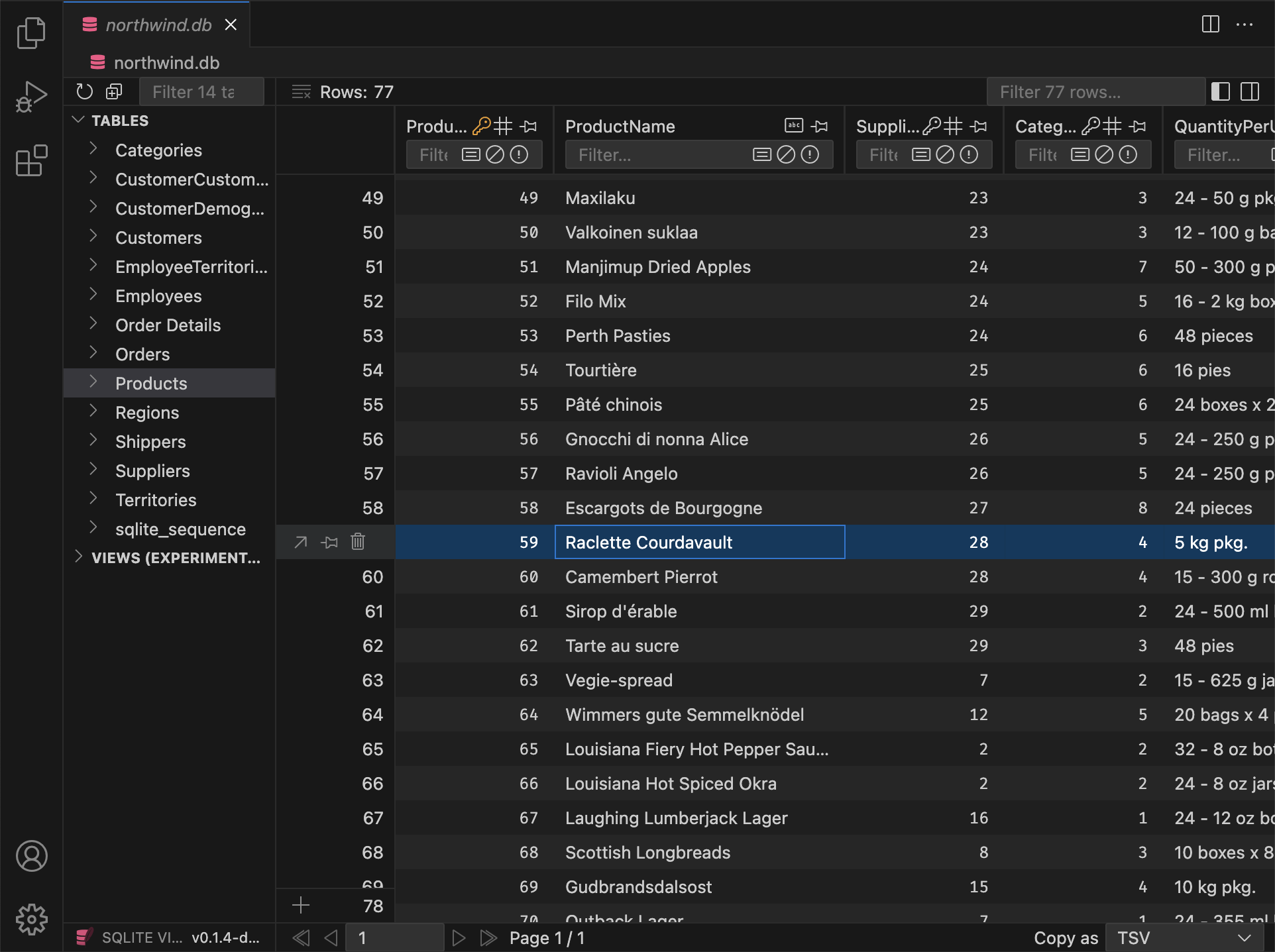
SQLite Viewer는 성능을 염두에 두고 제작되었습니다. 웹 스택이 제공하는 최고의 도구를 사용하며, 구형 하드웨어에서도 정기적으로 테스트하여 성능이 최고 수준을 유지하도록 합니다.

일치하는 테마
불일치한 사용자 인터페이스와 작별하세요. SQLite Viewer는 자동으로 VS Code 테마에 맞춰 조정되어 기존 VS Code 경험에 원활하게 통합됩니다.
원클릭 설정
SQLite Viewer는 머신에 있는 바이너리에 의존하지 않습니다. 자체적으로 제공되므로 '설치'를 클릭하는 것만으로 설정이 완료됩니다. 전체 확장 프로그램의 크기는 15MB에 불과합니다.

어디서나 작동
Cursor, VS Codium, CodeSandbox, GitPod, Google IDX 또는 기타 VS Code 포크를 사용하든, SQLite Viewer는 환경에 맞춰 조정되어 가능한 많은 기능을 제공합니다.

개인 운영
SQLite Viewer는 단일, 헌신적인 개발자가 제작했습니다. 일관된 비전과 세부 사항에 대한 주의를 즐기며 순수 상업 제품에서는 드물게 발견됩니다.
등의 엔지니어가 사용※


업데이트, 지속적으로 제공
SQLite Viewer PRO는 정기적인 업데이트와 새로운 기능으로 계속 개선되고 있습니다. 아래에서 새로운 기능을 확인하세요:
v26.2.5 (Pre-Release, Hotfix)
PRO Fixed an issue that prevented inline foreign key previews from resolvingPRO Inline FK content no longer loads for collapsed items (only loads when expanded).
v26.2.4 Preview
PRO Markdown Preview
Columns that store markdown can now be viewed with a rendered preview in the row detail modal. A switch lets you toggle between plain text and the rendered view; You can treat any TEXT column as markdown by cycling its type in the column header (same gesture as for date/datetime). Declared types such as TEXT MARKDOWN or MDTEXT are recognized by default.
When you open a cell in a markdown column in VS Code, the file opens with a .md extension by default, so the editor uses markdown highlighting and tooling without relying on language detection.
Additions
PRO Backspace now sets the focused column to NULL for all selected rowsPRO In the row detail modal, date/time columns now show the same date display as in the table
Changes
- Resized textarea heights are now remembered for the duration of the session
- Opening a DB now selects the first table (not the first item, which could be a view)
PRO All buttons that cycle properties now reset to their default value on right-clickPRO Pragma Editor Optimize action now defaults to "Dry Run"PRO Date/raw toggle in modal is now per column
Fixes
PRO Batch edit in row detail now updates all selected rows correctlyPRO Fixed an issue where editing a cell via "Open in VS Code" could leave the selection stuck on "No row selected"- Ctrl+A (Cmd+A) in sidebar inputs selects all text in that input only
- View row counts in the explorer show "∞" ("N/A") for unopened views instead of 0
PRO Deprecated pragmas are no longer shown in the Pragma Editor
v26.2.3 Preview
- Resolved visual artifacts that appeared during hover on fieldsets in certain themes
PRO The "Collapse All" button for inlined foreign keys now collapses every expanded level
v26.2.2 Preview
PRO Inline Foreign Keys in Row Detail
In the row detail modal (detail view), foreign key columns can now show the referenced row inline. You can expand or collapse each FK to see and edit the linked row without leaving the modal.
- Nested references are supported: expanding an FK can reveal further FKs in that row, each with its own expand/collapse.
- Editing works inline: you can change values in the referenced row and save; updates apply to the correct table.
Additions
- Primary key tooltips now list every table that references this column via foreign key
- The left sidebar now supports the same keyboard selection behavior as the main table
- Double-clicking a table or view in the left sidebar now expands or collapses it
Changes
- Changing focus in the main view no longer scrolls the corresponding value into view in the sidebar
- Fieldsets in the sidebar no longer display a visual active state
PRO Input field placeholders for columns with default values now display the default value or expression instead ofNULLPRO Input field placeholders for generated columns now display the generation expressionPRO Input fields for generated columns are now disabledPRO The file extension for hex files was renamed from.hexblobto.hexdump
Fixes
- The right sidebar no longer loses its scroll position when it is (auto-)closed.
- No accept-drop state when dragging a column over another table (sidebar or header).
PRO Add Column now accepts column types that contain spaces (e.g.TEXT MARKDOWN).PRO Various invalid foreign key/autoincrement/generated statements can no longer be created via the 'Add Column' UI
v26.2.1 Preview
Additions
PRO When adding columns to an empty table that references another table's composite primary key, the table now uses a single table-levelFOREIGN KEYconstraint instead of inlineREFERENCESon each column
Fixes
- 'Without Row ID' and 'Strict' options in the table info panel are now disabled when using the Free Version
PRO Add Table, Add Column, Drop Table, and drop column actions are now disabled when the database is read-only instead of throwing an errorPRO Fixes a bug when adding aPRIMARY KEYcolumn without specifying a column typePRO Dropping a column that is part of a composite primary key no longer failsPRO Fixed renaming of columns that are part of a composite primary keyPRO Fixed reordering columns when renaming in an empty tablePRO Fixed JSONB default values when adding or editing columnsPRO Fixed over-escaping of quotes in generated SQL in certain instances
Full Version History
Browse the complete changelog to see all features, bug fixes, and improvements across every version of SQLite Viewer PRO.
구독 없음, 문제 없음
SQLite Viewer PRO는 일회성 구매이며 영구 라이선스를 부여합니다. VS Code가 작동하는 한 작동합니다. 조직에서 정기 결제가 필요한 경우 월 구독도 이용할 수 있습니다.
주문은 당사의 온라인 리셀러 

먼저 사용해보고 싶으신가요? 14일 환불 보장을 이용하세요
14일 환불 보장을 이용하여 SQLite Viewer PRO를 최대 2주 동안 평가할 수 있습니다. 환불을 요청하려면 결제에 사용된 이메일로 refunds@sqliteviewer.app으로 연락하세요 — 설명은 필요하지 않습니다.
자주 묻는 질문
구매 후 PRO 버전을 어떻게 설치하나요?
명령 팔레트를 열고 "라이선스 키 활성화"를 입력하세요. 또는 SQLite Viewer 탭 내에서 "PRO로 업그레이드" 대화 상자를 열고 페이지 하단으로 스크롤하여 "라이선스 키 입력"를 클릭하세요. VS Code 창 상단에 입력 필드가 열립니다. 라이선스 키를 붙여넣고 Enter 키를 누르세요. 몇 초 내에 시스템 대화 상자가 활성화를 확인합니다.
PRO 버전을 여러 장치에서 사용할 수 있나요?
활성화 빈도에 대한 몇 가지 제한이 있지만, 이는 키 공유/게시 및 기타 남용을 방지하기 위해서만 설정되어 있습니다. 대부분의 고객은 라이선스 문제를 겪지 않습니다.
오프라인 라이선스 활성화는 어떻게 작동하나요?
이 방법으로 등록된 장치는 Business Edition 키가 사용되고 토큰 생성 시 "Business Edition 평가" 체크박스가 선택되지 않은 한 라이선스 서버에 연결을 시도하지 않습니다.
- 회사의 방화벽이 확장 프로그램이 라이선스 서버에 연결되는 것을 방지하는 경우 오프라인 활성화가 필요합니다.
- 오프라인 활성화를 통해 장치가 등록되면 확장 프로그램은 라이선스 서버에 다시 연결할 필요 없이 사용할 수 있습니다.