




 などのエンジニアが使用※
PRO専用のワークフローをアンロックするためにアップグレード
VS Codeとの深い統合により、SQLite Viewer PROは比類のない利便性と速度で新しいワークフローを可能にします。
PROの要求に応じて根本から再設計
PROバージョンはSQLite Viewer 2と考えることができます。 単なる機能フラグではなく、完全に新しいエンジンが内部にあります。SQLiteフェイルオーバー保証と大容量ファイルサポートを備えています。

ネイティブSQLite
PROバージョンは公式のSQLite実装を使用し、完全なフェイルオーバー保証を提供します。 旧読み取り専用クライアントはフォールバックとして残ります。

無制限のファイルサイズ
ファイルサイズに関するすべての制限が解除されます。リモートセッション中でも。 UIをレンダリングするために必要なデータのみがローカルマシンに転送されます。

広告なしの体験
PROのお客様は広告なしの体験を楽しむことができます。画面共有や録画に最適。 さらに、PROのお客様はUIに専用のPROアイコン( )を受け取ります。
無料版のすべての機能も含まれています
SQLite Viewer PROへのアップグレードはシームレスな体験です。ライセンスキーを入力するだけで準備完了です。 新しい専用PRO機能に加えて、無料版で気に入っているすべての機能がそのまま残ります。

パフォーマンスに優れたUI
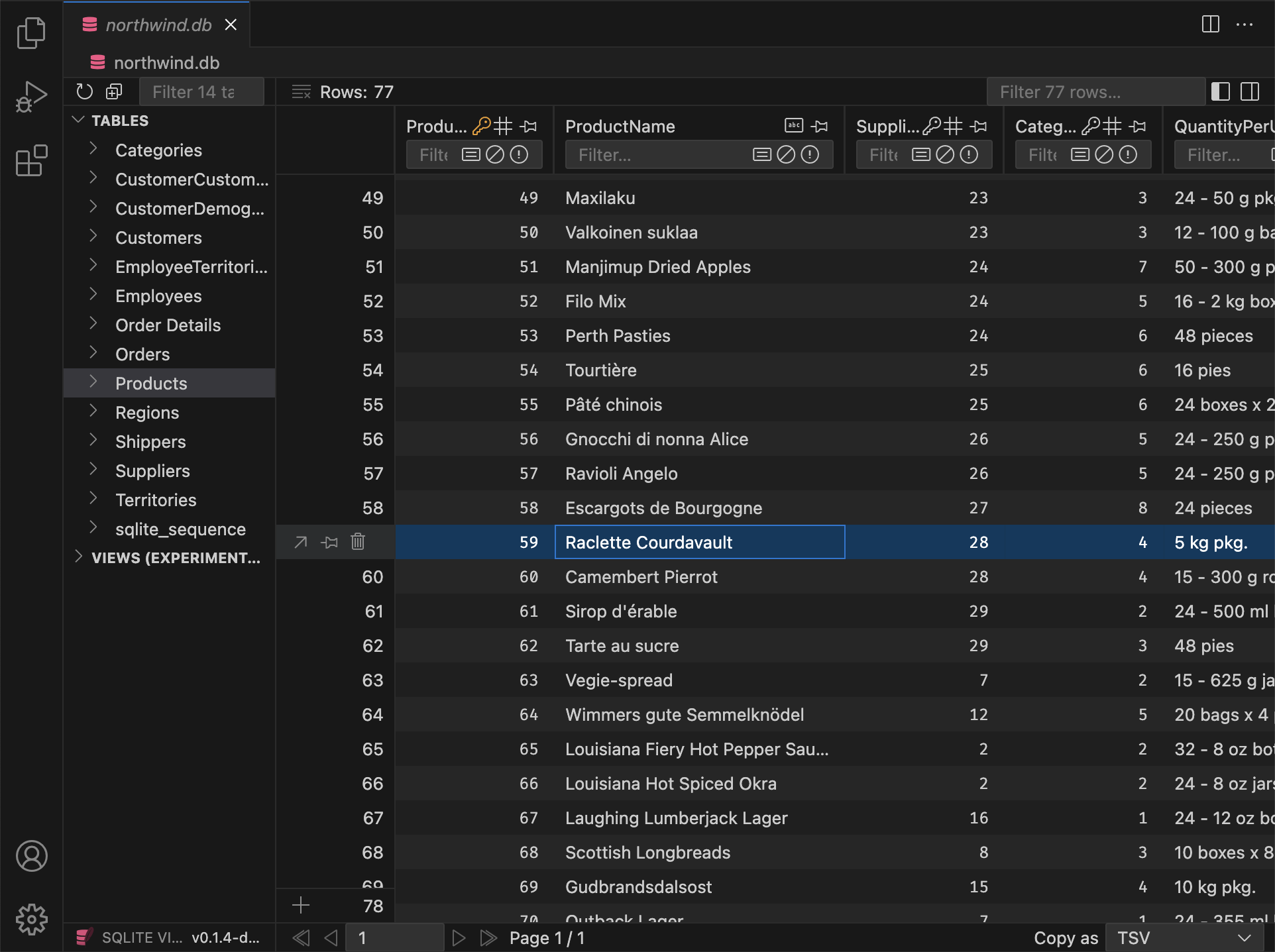
SQLite Viewerはパフォーマンスを重視して設計されています。Webスタックの最高のツールを使用し、 古いハードウェアでも定期的にテストされ、パフォーマンスがトップレベルに保たれます。

テーマに合わせたデザイン
一貫性のないユーザーインターフェースとはおさらばです。SQLite ViewerはVS Codeのテーマに自動的に適応し、 既存のVS Code体験にシームレスに統合されます。
ワンクリックセットアップ
SQLite Viewerはマシン上のバイナリに依存しません。独自のバイナリを持ち、「インストール」をクリックするだけでセットアップが完了します。 拡張機能全体のサイズはわずか15 MBです。

どこでも動作
Cursor、VS Codium、CodeSandbox、GitPod、Google IDX、その他のVS Codeフォークを使用している場合でも、 SQLite Viewerは環境に適応し、可能な限り多くの機能を提供します。

オーナー運営
SQLite Viewerは1人の専任開発者によって作成されています。一貫したビジョンと細部へのこだわりがあり、 純粋に商業的な製品ではめったに見られません。
などのエンジニアが使用※


更新、継続的に配信
SQLite Viewer PROは定期的なアップデートと新機能で常に改善されています。以下で新機能をご確認ください:
v26.2.5 (Pre-Release, Hotfix)
PRO Fixed an issue that prevented inline foreign key previews from resolvingPRO Inline FK content no longer loads for collapsed items (only loads when expanded).
v26.2.4 Preview
PRO Markdown Preview
Columns that store markdown can now be viewed with a rendered preview in the row detail modal. A switch lets you toggle between plain text and the rendered view; You can treat any TEXT column as markdown by cycling its type in the column header (same gesture as for date/datetime). Declared types such as TEXT MARKDOWN or MDTEXT are recognized by default.
When you open a cell in a markdown column in VS Code, the file opens with a .md extension by default, so the editor uses markdown highlighting and tooling without relying on language detection.
Additions
PRO Backspace now sets the focused column to NULL for all selected rowsPRO In the row detail modal, date/time columns now show the same date display as in the table
Changes
- Resized textarea heights are now remembered for the duration of the session
- Opening a DB now selects the first table (not the first item, which could be a view)
PRO All buttons that cycle properties now reset to their default value on right-clickPRO Pragma Editor Optimize action now defaults to "Dry Run"PRO Date/raw toggle in modal is now per column
Fixes
PRO Batch edit in row detail now updates all selected rows correctlyPRO Fixed an issue where editing a cell via "Open in VS Code" could leave the selection stuck on "No row selected"- Ctrl+A (Cmd+A) in sidebar inputs selects all text in that input only
- View row counts in the explorer show "∞" ("N/A") for unopened views instead of 0
PRO Deprecated pragmas are no longer shown in the Pragma Editor
v26.2.3 Preview
- Resolved visual artifacts that appeared during hover on fieldsets in certain themes
PRO The "Collapse All" button for inlined foreign keys now collapses every expanded level
v26.2.2 Preview
PRO Inline Foreign Keys in Row Detail
In the row detail modal (detail view), foreign key columns can now show the referenced row inline. You can expand or collapse each FK to see and edit the linked row without leaving the modal.
- Nested references are supported: expanding an FK can reveal further FKs in that row, each with its own expand/collapse.
- Editing works inline: you can change values in the referenced row and save; updates apply to the correct table.
Additions
- Primary key tooltips now list every table that references this column via foreign key
- The left sidebar now supports the same keyboard selection behavior as the main table
- Double-clicking a table or view in the left sidebar now expands or collapses it
Changes
- Changing focus in the main view no longer scrolls the corresponding value into view in the sidebar
- Fieldsets in the sidebar no longer display a visual active state
PRO Input field placeholders for columns with default values now display the default value or expression instead ofNULLPRO Input field placeholders for generated columns now display the generation expressionPRO Input fields for generated columns are now disabledPRO The file extension for hex files was renamed from.hexblobto.hexdump
Fixes
- The right sidebar no longer loses its scroll position when it is (auto-)closed.
- No accept-drop state when dragging a column over another table (sidebar or header).
PRO Add Column now accepts column types that contain spaces (e.g.TEXT MARKDOWN).PRO Various invalid foreign key/autoincrement/generated statements can no longer be created via the 'Add Column' UI
v26.2.1 Preview
Additions
PRO When adding columns to an empty table that references another table's composite primary key, the table now uses a single table-levelFOREIGN KEYconstraint instead of inlineREFERENCESon each column
Fixes
- 'Without Row ID' and 'Strict' options in the table info panel are now disabled when using the Free Version
PRO Add Table, Add Column, Drop Table, and drop column actions are now disabled when the database is read-only instead of throwing an errorPRO Fixes a bug when adding aPRIMARY KEYcolumn without specifying a column typePRO Dropping a column that is part of a composite primary key no longer failsPRO Fixed renaming of columns that are part of a composite primary keyPRO Fixed reordering columns when renaming in an empty tablePRO Fixed JSONB default values when adding or editing columnsPRO Fixed over-escaping of quotes in generated SQL in certain instances
Full Version History
Browse the complete changelog to see all features, bug fixes, and improvements across every version of SQLite Viewer PRO.
サブスクリプションなし、問題なし
SQLite Viewer PROは一度の購入で永久ライセンスを提供します。VS Codeが動作する限り動作します。 組織が定期的な支払いを必要とする場合、月額サブスクリプションも利用できます。
注文は当社のオンラインリセラー 

まず試してみたいですか?14日間の返金保証を利用してください
SQLite Viewer PROを最大2週間評価し、14日間の返金保証を利用できます。 返金をリクエストするには、購入時に使用したメールアドレスでrefunds@sqliteviewer.appに連絡してください。説明は不要です。
よくある質問
購入後にPROバージョンをインストールするにはどうすればよいですか?
コマンドパレットを開き、"ライセンスキーをアクティブ化"と入力します。あるいは、SQLite Viewerタブ内の"PROにアップグレード"ダイアログを開き、 ページの下部までスクロールして"ライセンスキーを入力"をクリックします。VS Codeウィンドウの上部に入力フィールドが表示されます。 ライセンスキーを貼り付けてEnterキーを押します。数秒以内にシステムダイアログがアクティベーションを確認します。
PROバージョンを複数のデバイスで使用できますか?
アクティベーション頻度にいくつかの制限がありますが、これらはキーの共有/公開やその他の悪用を防ぐためだけに設けられています。 大多数のお客様はライセンスの問題に遭遇することはありません。
オフラインライセンス認証はどのように機能しますか?
この方法で登録されたデバイスは、Business Editionキーが使用され、トークン生成時に"Business Edition評価"チェックボックスがチェックされていない限り、 ライセンスサーバーへの接続を試行することはありません。
- 企業のファイアウォールがライセンスサーバーへの接続を妨げる場合、オフラインアクティベーションが必要です。
- デバイスがオフラインアクティベーションを通じて登録されると、ライセンスサーバーに再接続することなく拡張機能を使用できます。